Updated: July 14, 2026
This post contains affiliate links. As an Amazon Associate I earn from qualifying purchases at no extra cost to you.
My Go-To 60/40 Settings
After testing dozens of 60/40 cotton-poly shirts, here’s what works best for me: 375-385F for 45-55 seconds at medium pressure. Fair warning. Your colors will look more “vintage” compared to 100% polyester. That’s totally normal and honestly, a lot of my customers love that softer look! Always pre-press for 3-5 seconds first to get rid of any moisture.
For sublimation printing to work well, the heat press settings must be just right. The 60/40 set has become popular among both beginners and experts in sublimation. We understand if you’re curious about it too.
So, what do they mean by “sublimation heat press settings 60/40”?
The process of sublimation printing involves preheating the heat process, printing the design on sublimation paper, setting the timer, and then removing any moisture. It is also followed by placing the substrate, waiting for the signal, and in the end bringing the base out. The general settings sublimation heat press settings for a 60/40 is as follows:
- Temperature: 375-400°F (190-204°C)
- Time: 45-60 seconds
- Pressure: Medium (35-50 psi)
This is just a general idea of how it works. It’s important to delve deep into these steps to fully understand the process for flawless results.
So, what’s the holdup? Start reading!
What Are Sublimation Heat Press Settings 60/40?
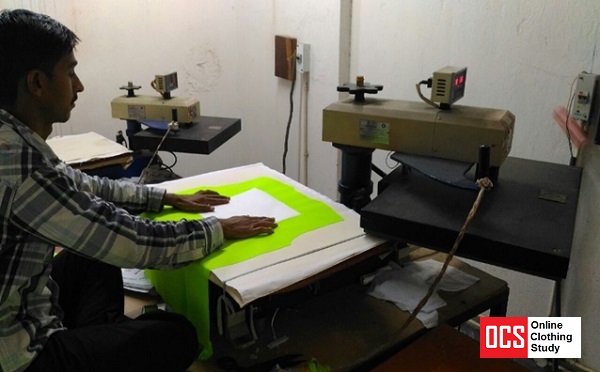
The sublimation heat press settings refer to the right temperature to be used for fabrics that are a blend of 60% cotton and 40% polyester. When working with such fabric blend composure, for best results, it’s crucial to choose the right heat press settings.
It is often advised to set the heat press temperature at around 360 degrees Fahrenheit (182 degrees Celsius, approximate) and apply pressure for 35 seconds when using this specific blend.
These settings give the dye enough heat and time to leave the paper and penetrate the fabric, producing vivid and long-lasting designs.
To achieve precise and successful sublimation printing on a fabric blend of 60% cotton and 40% polyester, it is always important to refer to the documentation provided by the heat press machine manufacturer and sublimation ink supplier.
My Cotton-Polyester Blend Settings Cheat Sheet
I keep this chart taped to the wall next to my heat press because honestly, I can never remember all the different settings! Different fabric blends really do need different treatment, and I learned this the hard way after ruining a few shirts early on.
| Fabric Blend | Temp | Time | What to Expect |
|---|---|---|---|
| 100% Polyester | 385-400°F | 45-60 sec | Bright, vibrant colors |
| 60/40 Cotton-Poly | 375-385°F | 45-55 sec | Soft vintage look |
| 50/50 Cotton-Poly | 370-380°F | 40-50 sec | More faded/washed |
| 65/35 Poly-Cotton | 380-390°F | 50-60 sec | Good color, slight softness |
Here’s what I wish someone had told me when I started: the higher the polyester percentage, the brighter your colors will be. So if you’re doing 60/40 shirts, embrace that vintage aesthetic! Some of my best-selling designs actually look better with that softer, worn-in vibe.
Sublimation Heat Press With 60/40 Settings [Step-By-Step Guideline]
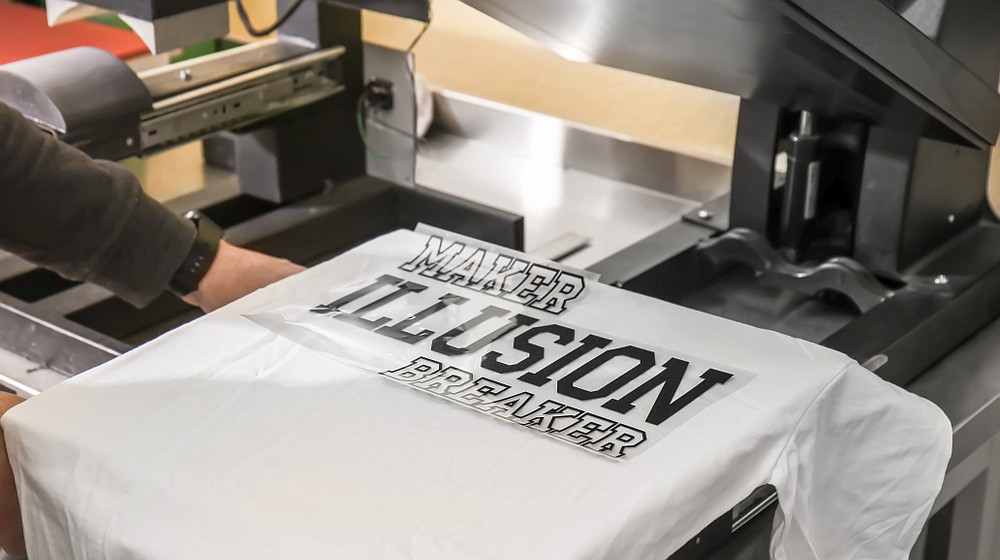
Try to avoid the common problems when sublimating and reap the best results. Here is a step-by-step guideline for sublimation heat press settings 60/40:
Step 1: Preheat The Heat Press
Preheating is important because it gives the heat press time to get to the right temperature before the transfer is put on. As suggested before, you need to heat the press to around 375-400°F (190-204°C), which is a normally advised temperature for the 60/40 sublimation. So to heat at that temperature, you need to preheat to that amount to make it ready for the sublimation.
This makes sure that the heat is spread properly through the press when the transfer is being pressed onto the substrate. Always be careful of sublimation fumes since they can be harmful.
Step 2: Print the Design Onto Sublimation Paper
You will need sublimation ink and a printer that is compatible with sublimation ink to print your design onto sublimation paper. Then, using the sublimation ink, print your design onto the sublimation paper.
When this process is done, the design is ready to be sublimated on the fabric. Set it carefully somewhere before you head over to the next step to complete the hea
Step 3: Set The Timer
Set the timer on the heat press to 45-60 seconds. The sublimation process is directly affected by how long the turn of the heat press is. When there is enough pressing time, the dye can fully sublimate onto the material. This makes for a bright and long-lasting color transfer.
Step 4: Press To Remove Moisture
Press the shirt or cloth for 3 to 5 seconds at Medium (35-50 psi) pressure before using the iron to get rid of moisture. Pre-pressing is an important step, especially when it comes to such cotton and polyester blend fabric. It helps get rid of any wetness on the substrate.
Step 5: Place The Substrate
Put the substrate on the bottom platen and the transfer paper on the top platen so that the printed side is looking down. For exact and bright sublimation results, the substrate and transfer paper must be put in the right place.
Putting the substrate on the bottom platen spreads the heat evenly, and putting the printed side of the transfer paper down makes sure that the image gets transferred to the substrate properly. Make sure to get the best paper for cotton when sublimating.
Step 6: Wait For Signal
Wait for the heat press to signal or beep to let you know that the transfer is done. Most heat presses have an icon or timer built in that lets you know when the pressing time is up. By waiting for the signal, the dye will have had enough time to sublimate onto the material.
Step 7: Bring The Base Out
Take the base out of the heat press with care and let it cool down. Once the sublimation process is done, you should be careful with the material. Taking the substrate out of the heat press lets it cool down.
By paying close attention to each step, you may fine-tune your sublimation process and create brilliant, durable, and professional-looking sublimated items. If you’re not looking for just affordable sublimation printers, you can go for the VEVOR Heat Press Machine or the Slendor 5 in 1 Heat Press Machine.
When Things Go Wrong (And How to Fix Them)
Trust me, I’ve made every mistake in the book when it comes to sublimating on cotton blends. Here’s what I’ve learned from all those “oops” moments:
Your Colors Look Too Faded
First off, take a deep breath. This is probably normal! With 60/40 blends, the cotton fibers simply don’t absorb sublimation ink. Only the polyester part (that 40%) is actually holding your design. When I first started, I thought I was doing something wrong, but it’s just how the science works.
If you really want brighter colors, try using fabrics with higher polyester content. I’ve also had some luck with bumping the temperature up just a tiny bit (maybe 5 degrees) and adding 5-10 extra seconds to the press time. But honestly? I’ve learned to embrace the vintage look. My customers actually request it now!
Spotty or Uneven Colors
This one drove me crazy until I figured it out. Nine times out of ten, it’s moisture in the fabric. Now I always pre-press for 3-5 seconds before putting the transfer on. Game changer! Also check that your heat press is applying even pressure. Mine was slightly off-kilter for months before I noticed.
Scorched or Yellowed Fabric
Ugh, the worst feeling! This happens when the cotton gets too much heat. Drop your temperature to around 375F and reduce your time to about 45 seconds. I also always use butcher paper on top now. Learned that lesson the expensive way with a batch of custom shirts for a client.
My Recommended Supplies for Cotton-Poly Blends:
- Next Level 6210 CVC Tee (60/40 Cotton-Poly). The go-to 60/40 blend shirt for sublimation, soft ring-spun fabric
- Subli+Mate Sublimation Spray (200ml). Spray on cotton fibers to boost color vibrancy on blends
- Butcher Paper Sheets. Prevents scorching on cotton blends and catches dye blowout
As an Amazon Associate I earn from qualifying purchases.
FAQs
Is it possible to sublimate 50% cotton and 50% poly?
Yes, you can sublimate a fabric that is 50% cotton and 50% synthetic. But the colors won’t be as bright as when they are made of 100% polyester. How bright the color is in a blend depends on how much polyester is in it. So, a 50/50 blend commonly has a “washed out” or “vintage” look. This is sometimes thought to be wrong.
Does polyester 60/40 shrink?
It is probable to shrink a shirt made of 60% cotton and 40% polyester, but the shrinkage will not be uniform. Because cotton fibers shrink more than polyester ones. Hence, the general form of the shirt will alter as a result of washing. When cloth shrinks, it often loses its form and might get wrinkled.
Is it possible to sublimate a hundred percent cotton?
Yes, sublimation is possible with a fabric that is all cotton. However, the ink will quickly fade if you simply sublimate on 100% cotton garments. Sublimation coating spray or heat transfer vinyl can be used as a barrier layer for sublimation printing on 100 percent cotton shirts.
What temperature works best for 60/40 sublimation?
I’ve found that 375-385F hits the sweet spot for me. Going higher risks scorching the cotton fibers (not fun to explain to customers!), while going lower leaves you with incomplete transfer. Every heat press is a little different though, so I always recommend doing a test piece first. My first few 60/40 shirts were definitely learning experiences!
How long should I press 60/40 shirts?
I press mine for 45-55 seconds at medium pressure. It’s a bit shorter than what I use for 100% polyester because the cotton can start to scorch if you leave it too long. The most important thing I’ve learned? Always pre-press for 3-5 seconds first to get rid of moisture. Skip that step and you’ll end up with spotty colors. Ask me how I know!
Why does my 60/40 sublimation look faded?
This is completely normal, and honestly it worried me so much when I was starting out! Here’s the thing. Sublimation ink only bonds with polyester fibers, not cotton. So with a 60/40 blend, only 40% of the fibers are actually holding your design. The result is that softer, “vintage” look. Once I stopped fighting it and started marketing it as a feature, my customers actually started requesting it!
Conclusion
That’s all for today. Hopefully, all your doubts regarding sublimation heat press settings 60/40 were clarified. Once you get used to the process, you will become an expert very quickly.
Till next time, adios!


Emily Johnson is a DIY crafter and the founder of SublimationGuides.com. She started out repairing and sewing clothes for her two sons, then discovered sublimation as a way to personalize her makes. Today she researches and shares honest, tested guides on sublimation settings, troubleshooting, and equipment.