Updated: July 23, 2026
My Quick Answer
Sublimation on glass only works on poly-coated glass blanks. For flat coated glass (cutting boards, coasters), a common starting point is 375-400°F (190-204°C) for 180-300 seconds with light-to-medium pressure. Cutting boards vary more than most blanks, so treat any number as a starting point and follow the sheet that came with yours. For glass cans and tumblers, start lower. Often 370-380°F (188-193°C) for 90-120 seconds, and adjust in small steps. Always follow your blank supplier’s recommended settings and test one piece first.
Some links on this page are affiliate links. As an Amazon Associate I earn from qualifying purchases, at no extra cost to you.
Sublimation on glass is one of the most rewarding sublimation projects you can do. Glass cutting boards, photo frames, ornaments, beer can glasses. The results look absolutely stunning when the settings are right. The tricky part? Glass is fragile and heats unevenly, so the approach is different from mugs or t-shirts.
The most important thing to understand right away: you can’t sublimate on regular glass from the dollar store. The glass needs a special polyester coating that holds the sublimation dye. Without that coating, the ink has nothing to bond to and you’ll end up with a blank piece of glass and wasted paper.
Quick Definition
Sublimation Coating: a thin polymer layer applied to hard blanks like mugs, tumblers, glass, and metal so they can accept sublimation dye. Without this coating, sublimation ink cannot bond to the surface, which is why only sublimation-ready blanks work.
What Glass Can You Sublimate On?
Not all glass works for sublimation, and picking the wrong type is a fast way to waste time and blanks.
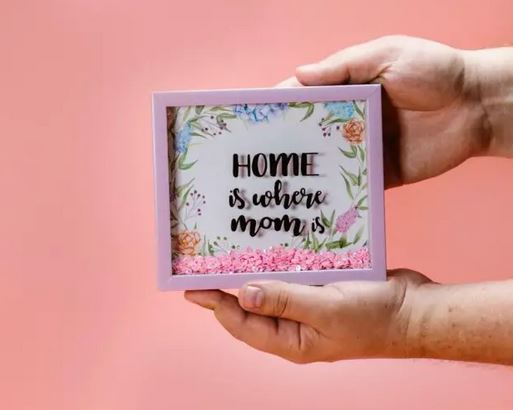
Sublimation-coated glass blanks are the only reliable option. These come pre-coated with a polyester layer (usually a white or frosted backing) that accepts sublimation dye. You’ll find them as cutting boards, photo frames, coasters, ornaments, tiles, and beer can glasses. Always buy blanks that are specifically labeled “sublimation ready” or “poly-coated.”
Frosted vs. clear glass. This matters more than most people think. Frosted glass blanks have a white-ish coating that makes colors pop vibrantly, similar to printing on white paper. Clear glass blanks show the design through the back, so colors appear more muted and the background behind the glass affects how the design looks. For bold, colorful designs, frosted glass is almost always the better choice. Clear glass works best for simple designs or when you want a see-through effect.
Regular uncoated glass won’t hold sublimation ink on its own. There are DIY coating sprays like Subli Glaze that claim to make regular glass sublimation-ready, but results are inconsistent compared to proper pre-coated blanks. More on that below.
My tip: Tempered glass blanks are the safest choice because they handle thermal stress better. If your blank isn’t labeled tempered, use lighter pressure and start at the low end of the time range.
Sublimation on Glass Temperature and Time Settings
Getting the right sublimation on glass temperature and time is critical because glass is less forgiving than other substrates. Too hot or too long and you risk cracking. Too cool or too short and colors come out faded.
| Glass Product | Temperature | Time | Pressure | Notes |
|---|---|---|---|---|
| Glass Cutting Board | 375-400°F (190-204°C) | 180-300 sec | Light-Medium | Settings vary by blank, so follow your supplier sheet. Use Teflon above and below; don’t mirror if pressing on back and viewing through glass |
| Glass Photo Frame | 380-400°F (193-204°C) | 180-210 sec | Light-Medium | Light pressure. Frames are thinner and crack easily |
| Glass Ornament | 375-385°F (190-196°C) | 120-180 sec | Light | Use a Nomex pad for uneven surfaces; great for seasonal gifts |
| Glass Coaster | 400°F (204°C) | 180-200 sec | Medium | Similar to cutting boards; smaller size = slightly less time |
| Beer Can Glass / Glass Cup | 370-380°F (188-193°C) | 90-120 sec | Light-Medium | Common supplier baseline; mug press, rotate halfway if needed. Increase time in small steps if colors are faded |
| Glass Tile | 400°F (204°C) | 240-300 sec | Medium-Firm | Thicker glass = longer time; test a sample tile first |
| Shot Glass | 400°F (204°C) | 5-8 min (oven) | N/A (shrink wrap) | Oven recommended; mug press possible if it fits (370-380°F, 90-120 sec, light-medium) |
| Glass Mug | 370-385°F (188-196°C) | 90-150 sec | Light-Medium | Mug press; check your blank supplier’s recommended settings |
My tip: Always start at the lower end of the temperature range and work up. A faded test print is fixable. A cracked piece of glass is not. These settings are starting points, and every press runs slightly different. Keep notes on what works for your specific setup.
For a deeper look at heat press settings in general, check out the heat press settings guide for 60/40 blends.
What You Need for Glass Sublimation
Glass sublimation doesn’t require exotic equipment. If you already sublimate mugs or t-shirts, you likely have most of what you need.
You’ll need a sublimation printer with sublimation ink. An Epson EcoTank like the ET-8550 or ET-15000 works perfectly. If you’re still choosing a printer, here’s a guide on Epson printers you can convert for sublimation. You also need quality sublimation paper and sublimation ink. Don’t mix brands between ink and paper if you can avoid it.
For the pressing itself, you’ll need a flat heat press for cutting boards, frames, coasters, and tiles. For glass cups and beer can glasses, a mug press is essential. A multi-purpose press like the Vevor 15×15 8-in-1 covers both. For smaller projects, the Cricut EasyPress 2 is a solid option.
Don’t forget the essentials: Teflon sheets (above and below the glass to protect it and your press), heat-resistant tape, butcher paper for blowout protection, rubbing alcohol for cleaning the blank, and heat-resistant gloves. Glass gets extremely hot. Never handle it bare-handed after pressing.
How to Sublimate on Flat Glass (Cutting Boards, Tiles, Frames)
Flat glass items like cutting boards, coasters, and photo frames are the easiest glass projects to start with. The process is straightforward if you follow these steps carefully.
Start by cleaning the glass blank thoroughly with rubbing alcohol and a lint-free cloth. Any fingerprints, dust, or oils on the surface will show up in the final transfer as blank spots or smudges. This step seems minor but it makes a noticeable difference.
Print your design on sublimation paper. Mirroring depends on the blank type. For flat glass like cutting boards, coasters, and frames, do NOT mirror your image. The design transfers onto the coated back and you view it through the front of the glass, which flips it automatically. If you mirror the file, text and images will appear backwards. This catches a lot of people off guard on their first glass project.
Tape the printed sublimation paper face-down onto the coated side of the glass blank using heat-resistant tape. Make sure there are absolutely no wrinkles or gaps. Any movement during pressing causes ghosting, and with glass there’s no fixing it. Use more tape than you think you need.
Place a Teflon sheet on the bottom platen of your heat press, then set the glass blank on top (paper side facing up). Place another Teflon sheet on top. This sandwich protects both the glass and your press from stray dye. Set your temperature to 375-400°F (190-204°C), light-to-medium pressure, and press for 180-300 seconds for cutting boards, or follow the chart above for your specific item. Tested boards land right across that range, so the sheet from your supplier beats any general number.
When the timer goes off, carefully remove the glass using heat-resistant gloves. Peeling depends on the blank and your supplier. Some glass blanks peel best while still warm or hot (use heat gloves). Others recommend letting the glass cool fully before peeling to reduce ghosting risk. If you’re unsure, test both methods on one spare blank and follow your blank supplier’s instructions. Never cool glass in water. Thermal shock can crack it instantly.
Pro tip: Pre-warm the glass blank for 5-10 seconds before your full press cycle. This reduces thermal shock from the sudden jump to 400°F, especially in cooler workspaces where the glass may be cold.
How to Sublimate Glass Cups and Beer Can Glasses
Glass cups, beer can glasses, and frosted glass tumblers are hugely popular right now, and they require a different approach than flat glass because of their curved shape.
You’ll need a mug press for this. A flat press won’t make proper contact around the curves. Clean the glass with rubbing alcohol, then wrap your sublimation paper around the glass and secure it tightly with heat-resistant tape. The paper should be snug against the glass with no air gaps. Some crafters use silicone wrap bands for extra security.
Unlike flat glass, glass cups and tumblers are pressed on the outside surface, so you DO need to mirror your image, just like regular mug sublimation. If you skip mirroring, any text will appear backwards.
Set the mug press to 370-380°F (188-193°C) and press for 90-120 seconds with light-to-medium pressure. If colors look faded after your test piece, increase time in small steps (15-20 seconds) before raising the temperature. If your press runs cool, you may need to go up to 385-400°F or extend the time, but start conservatively to avoid damaging the coating or cracking the glass. For even heat distribution, try pressing half the time, rotating the glass 180 degrees, and pressing the remaining half.
Peeling rule: Follow your blank supplier’s instructions. Many glass drinkware blanks are peeled hot (with heat-resistant gloves), then set aside to cool. Never cool glass in water. The thermal shock can crack it instantly.
My tip: Dark and bold designs look best on clear glass cups because the transparency makes lighter colors nearly invisible. If you want pastel or light-colored designs, go with frosted glass blanks instead.
For more tips on sublimating drinkware in general, check out the complete guide to sublimation on mugs and cups.
Convection Oven Method for Glass Sublimation
A convection oven is a great alternative when you don’t have a mug press or need to do multiple glass items at once. This method works especially well for shot glasses, glass cups, and ornaments. Anything with curves that doesn’t fit a flat press.
Wrap the sublimation paper around the glass and secure it with heat-resistant tape. Then slide a shrink wrap sleeve over the entire piece. The shrink wrap provides even pressure as it tightens around the glass during heating, replacing the mechanical pressure of a press.
Preheat the convection oven to 400°F (204°C) and place the wrapped glass items on a baking rack or silicone mat. Bake for 8-12 minutes for glass cups and 5-8 minutes for smaller items like shot glasses and ornaments. The times are much longer than a mug press because the oven heats more gradually and from all sides rather than direct contact.
Remove with heat-resistant gloves and let everything cool to room temperature before unwrapping. You can do 4-6 glass items at a time in a standard oven, which makes this method ideal for batch production or craft fair prep.
Important safety note: Use a dedicated sublimation oven, not your food oven. Many crafters prefer this to avoid any chance of residue or odors, and good ventilation is always recommended. A small countertop convection oven works perfectly for this. For more on this topic, read about whether sublimation fumes are harmful.
Clear vs. Frosted Glass: Which Should You Choose?
This is one of the most common questions when starting with glass sublimation, and the answer depends entirely on what you’re making.
Frosted glass has a white-ish translucent coating that acts like a white background for your design. Colors look vibrant and saturated, similar to sublimating on a white mug. Frosted glass is the safer choice for most projects, especially anything with photos, detailed artwork, or light colors. The frosted coating hides the “see-through” effect, so what you see is what you get.
Clear glass shows your design with transparency. Whatever is behind the glass (a wall, a shelf, a candle) becomes part of the visual effect. This looks stunning for minimalist designs, dark bold graphics, or glass that will be backlit. The downside is that light colors essentially disappear on clear glass, and the final look changes depending on the background.
Price-wise, frosted blanks tend to cost slightly more. For beginners, frosted glass is the best starting point because it’s more predictable and forgiving.
Can You Sublimate on Regular Glass?
Technically, you can apply a DIY sublimation coating to regular glass using products like Subli Glaze or polyester-based sublimation sprays. These create a thin poly layer that the sublimation ink bonds to.
That said, results with DIY coatings are hit-or-miss. The coating needs to be perfectly even. Any thin spots or drips will show up as faded patches or streaks in the final design. Achieving consistent results requires practice and careful spray technique.
For anyone serious about glass sublimation, buying pre-coated blanks is the better path. The coating quality is consistent, the results are predictable, and the per-piece cost difference is small once you factor in the coating product and the extra time. DIY coating makes more sense for one-off custom shapes where sublimation blanks aren’t available.
Troubleshooting Sublimation on Glass
Glass sublimation has its own set of common problems. Here’s how to identify and fix the most frequent issues.
Faded or washed-out colors usually mean not enough time or temperature. Try adding 20-30 seconds to your press time first. If that doesn’t help, increase temperature by 5°F (3°C). Also check that your glass blank actually has a sublimation coating. Uncoated glass won’t transfer any color at all. Old or dried-out sublimation ink can also cause fading even with correct settings.
Glass cracking during pressing is almost always caused by too much pressure or using non-tempered glass. Reduce your pressure setting and make sure you’re using blanks rated for heat. Pre-warming the glass for 10-15 seconds at a lower temperature before full pressing can help reduce thermal shock. Never press glass that’s been sitting in a cold room without warming it first.
Ghosting or blurry image means the paper shifted during pressing. With glass, even tiny movement ruins the result because there’s no “bleed-in” like you get with fabric. Use more heat-resistant tape, and make sure the paper is completely flat against the glass surface before pressing.
Colors look green or blue instead of the expected colors? This is a color management issue, not a glass-specific problem. Your printer and ink combination may need an ICC color profile. For a full walkthrough on fixing this, check out why sublimation prints green instead of blue.
Uneven transfer on curved glass happens when the mug press doesn’t make consistent contact all the way around. Try the rotation method (press half the time, rotate 180°, press the remaining half). For the oven method, make sure your shrink wrap is tight enough to hold the paper firmly against the glass. Silicone wrap bands can help with mug press contact too.
For more troubleshooting tips across all substrates, check out these guides: how to remove sublimation ghosting and sublimation paper stuck to tumbler.
How Long Does Sublimation on Glass Last?
Sublimation on glass is generally durable, but there are some important limitations to keep in mind.
On most flat glass blanks (cutting boards, coasters, frames), the design sits on the back and is naturally protected from scratching and everyday wear. This is why sublimated glass cutting boards are actually practical. You cut on the front glass surface while the design sits safely on the back. On glass drinkware (cups, beer can glasses), the print is usually on the outside surface, so it can scratch over time and needs gentler care.
For drinkware, hand washing is strongly recommended. Dishwashers use harsh detergents and high heat that can gradually degrade the sublimation coating over time, especially on cheaper blanks. Most quality sublimated glassware will survive occasional dishwasher cycles, but repeated exposure will cause fading eventually.
For decorative pieces like photo frames, ornaments, and tiles, durability is excellent because they’re not exposed to water or abrasion. These can last for years without any noticeable fading. Direct sunlight will cause gradual fading over a very long period, just like any printed material, but for normal indoor display this isn’t a real concern.
Food safety note: For glass cutting boards and drinkware, the sublimation coating is on the back or outside surface. It should never come in direct contact with food or beverages. The food-contact surface is the plain glass side, which is completely food-safe.
My Recommended Glass Sublimation Supplies:
- Sublimation Glass Cutting Board Blanks. Pre-coated tempered glass, ready to press
- Heat-Resistant Sublimation Tape (10mm). Essential for keeping paper in place on smooth glass
- Butcher Paper Sheets. Blowout protection for clean transfers
As an Amazon Associate I earn from qualifying purchases.
Read next: Sublimation Coasters: Settings for Every Type + Troubleshooting — settings for glass coasters, the most common glass project.
FAQs
What temperature and time for sublimation on glass?
It depends on the glass type. Flat items like cutting boards and tiles typically use 375-400°F (190-204°C) for 180-300 seconds, and the exact value depends on the blank. Glass drinkware (beer can glasses, cups) starts lower at 370-380°F (188-193°C) for 90-120 seconds. Always use sublimation-coated glass, follow your blank supplier’s recommended settings, and test one piece first before committing to a full batch.
Can you sublimate on glass cups?
Yes, you can sublimate on glass cups as long as they have a polyester sublimation coating. Beer can glasses and frosted glass tumblers are the most popular options. You’ll need a mug press or convection oven method since a flat press can’t make contact with curved surfaces. A common starting point is 370-380°F (188-193°C) for 90-120 seconds with light-to-medium pressure. Always check your blank supplier’s recommended settings and mirror your image (unlike flat glass).
Can you sublimate on regular glass?
Regular uncoated glass won’t hold sublimation ink. You need glass with a polyester coating for the dye to bond to. DIY coating sprays like Subli Glaze exist, but results are inconsistent. Pre-coated sublimation glass blanks give much more reliable results and are the recommended option for any serious project.
Do you mirror the image for sublimation on glass?
It depends on the blank type. For flat glass (cutting boards, coasters, frames), do NOT mirror. The design goes on the back and you view it through the front, which flips it automatically. For glass cups, beer can glasses, and tumblers, DO mirror. You’re pressing onto the outside surface, just like regular mug sublimation. Getting this wrong means backwards text, so always check your blank before printing.
Is sublimation on glass dishwasher safe?
Hand washing is recommended for sublimated glassware. Dishwashers use harsh detergents and high heat that can gradually degrade the sublimation coating, especially on cheaper blanks. Decorative glass items like photo frames and ornaments aren’t affected since they don’t get washed. Glass cutting boards are fine since the design is on the back, protected from the food-contact surface.
Can you sublimate glass in a convection oven?
Yes, a convection oven works well for glass sublimation, especially for curved items like cups, shot glasses, and ornaments. Wrap the glass in sublimation paper secured with tape, add a shrink wrap sleeve for pressure, and bake at 400°F (204°C) for 8-12 minutes. Use a dedicated oven, not one used for food preparation, because sublimation produces fumes when heated.
Final Thoughts
Sublimation on glass is absolutely worth learning. The finished products look professional, make incredible gifts, and glass cutting boards in particular are strong sellers for anyone running a sublimation business.
The key takeaways: always use sublimation-coated blanks, always use tempered glass, start with lower settings and work up, and keep a record of what works for your specific press. Glass is less forgiving than fabric or ceramic, but once you find your settings, the results are consistently beautiful.
Start with a glass cutting board. They’re the most beginner-friendly glass project, they’re affordable, and the flat surface makes them easy to press. From there, move to coasters, then cups and ornaments as you get more comfortable.
Related guides:
Complete Guide to Sublimation on Mugs and Cups
Sublimation Mug Temperature and Time Chart
Heat Press Settings for 60/40 Blends


Emily Johnson is a DIY crafter and the founder of SublimationGuides.com. She started out repairing and sewing clothes for her two sons, then discovered sublimation as a way to personalize her makes. Today she researches and shares honest, tested guides on sublimation settings, troubleshooting, and equipment.